In this part I will show you how you can update Nano server and Nano Server Package Provider.
Connect to your Nano Server:
Enter-PSSession -ComputerName <nanoservername>
Next we need to do is to receive the full list of applicable updates:
$session = New-CimInstance -Namespace root/Microsoft/Windows/WindowsUpdate -ClassName MSFT_WUOperationsSession

Next command is
$scanResults = Invoke-CimMethod -InputObject $session -MethodName ScanForUpdates -Arguments @{SearchCriteria=”IsInstalled=0″;OnlineScan=$true}

Let’s download and install all applicable updates by running:
$session = New-CimInstance -Namespace root/Microsoft/Windows/WindowsUpdate -ClassName MSFT_WUOperationsSession
$scanResults = Invoke-CimMethod -InputObject $session -MethodName ApplyApplicableUpdates (It will take some time so be patient!!!!)
Once done, Restart nano server by running Restart-Computer

To verify type in
Get-WindowsPackage –Online
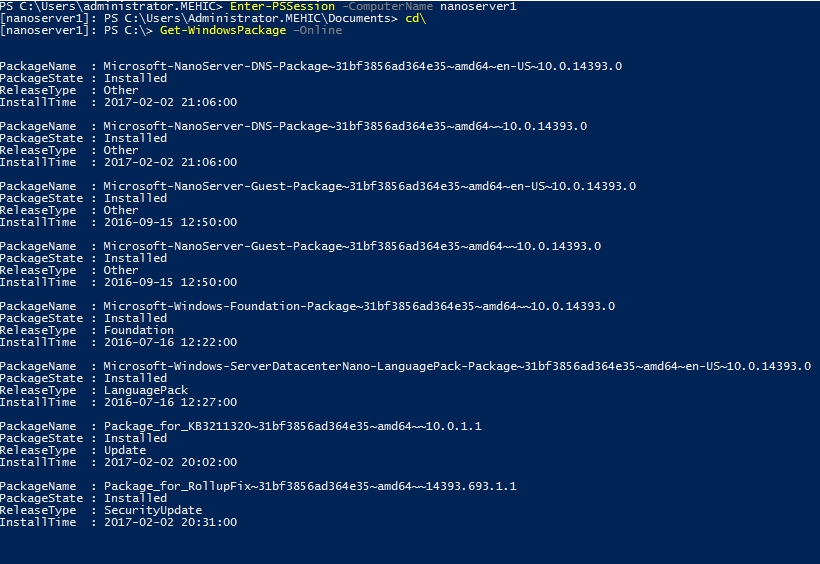
How to update Package Provider
To update Nano Server Package Provider Module run
Update-module nanoserverpackage

Cheers,
Nedim
 Nedim's IT CORNER
Leave a comment