
When we activate our Windows OS with activation key, the information is stored in the Windows Registry. Here’s a situation to be avoided. For one reason or the other you have to reinstall the Windows operating system but you discover that you don’t know the product key.
No worries. Use this script to extract your product key from the OS installed on your PC without using any third party software.
- Open Notepad
- Copy and paste the following text into the notepad window
function Get-WindowsKey {
    ## function to retrieve the Windows Product Key from any PC
    ## by Nedim Mehic
    param ($targets = ".")
    $hklm = 2147483650
    $regPath = "Software\Microsoft\Windows NT\CurrentVersion"
    $regValue = "DigitalProductId"
    Foreach ($target in $targets) {
        $productKey = $null
        $win32os = $null
        $wmi = [WMIClass]"\\$target\root\default:stdRegProv"
        $data = $wmi.GetBinaryValue($hklm,$regPath,$regValue)
        $binArray = ($data.uValue)[52..66]
        $charsArray = "B","C","D","F","G","H","J","K","M","P","Q","R","T","V","W","X","Y","2","3","4","6","7","8","9"
        ## decrypt base24 encoded binary data
        For ($i = 24; $i -ge 0; $i--) {
            $k = 0
            For ($j = 14; $j -ge 0; $j--) {
                $k = $k * 256 -bxor $binArray[$j]
                $binArray[$j] = [math]::truncate($k / 24)
                $k = $k % 24
            }
            $productKey = $charsArray[$k] + $productKey
            If (($i % 5 -eq 0) -and ($i -ne 0)) {
                $productKey = "-" + $productKey
            }
        }
        $win32os = Get-WmiObject Win32_OperatingSystem -computer $target
        $obj = New-Object Object
        $obj | Add-Member Noteproperty Computer -value $target
        $obj | Add-Member Noteproperty Caption -value $win32os.Caption
        $obj | Add-Member Noteproperty CSDVersion -value $win32os.CSDVersion
        $obj | Add-Member Noteproperty OSArch -value $win32os.OSArchitecture
        $obj | Add-Member Noteproperty BuildNumber -value $win32os.BuildNumber
        $obj | Add-Member Noteproperty RegisteredTo -value $win32os.RegisteredUser
        $obj | Add-Member Noteproperty ProductID -value $win32os.SerialNumber
        $obj | Add-Member Noteproperty ProductKey -value $productkey
        $obj
    }
}
- Save the file with the .ps1 extension on the Desktop or C:\. Exemple ProductKey.ps1
- Run Powershell as admin and type in
Set-ExecutionPolicy RemoteSigned
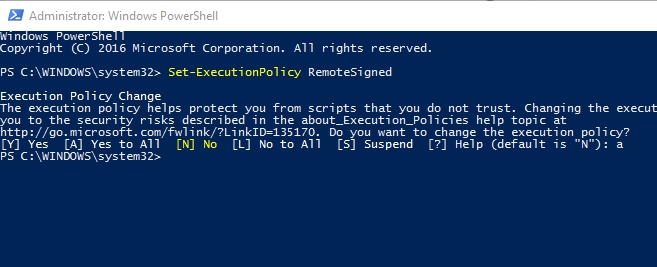
- Next run this command
Import-Module C:\Users\Master\Desktop\ProductKey.ps1; Get-WindowsKey
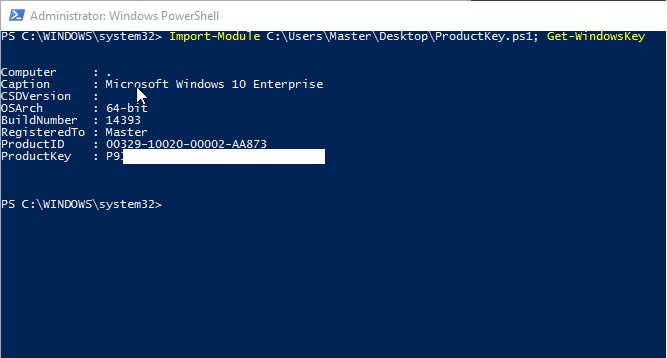
That’s it. Product key is displayed on the screen!
Cheers,
Nedim


 Nedim's IT CORNER
Leave a reply to M Aslam Jiffry Cancel reply